
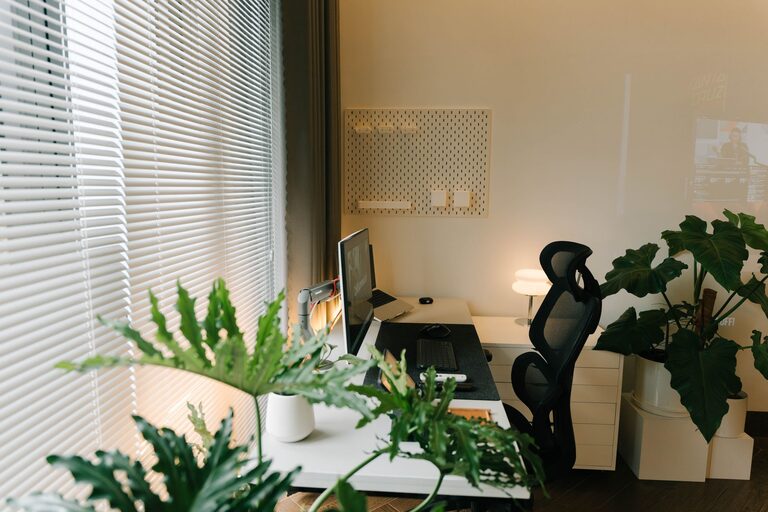
Creating a comfortable and productive home office environment is essential for anyone working remotely or spending significant hours at home on professional tasks. A well-designed workspace not only enhances focus but also supports physical wellbeing and work-life balance. This guide offers practical advice to help you transform any space into an efficient and pleasant home office.
1. Choose the Right Location
Selecting an appropriate spot for your home office is the first step toward productivity. Ideally, find a quiet area with minimal interruptions and enough space for your needs.
– Natural light: Position your desk near a window to benefit from daylight, which can improve mood and reduce eye strain.
– Privacy: Choose a room or corner away from household noise to maintain focus.
– Accessibility: Ensure the area is easily accessible but separated enough to switch off work when the day ends.
2. Invest in Ergonomic Furniture
Comfort plays a big role in productivity. Ergonomic furniture supports your posture and prevents discomfort during long hours of work.
– Chair: Opt for an adjustable chair with lumbar support that promotes an upright posture.
– Desk: A desk at the correct height keeps your wrists and arms comfortable.
– Standing options: Consider a sit-stand desk or desk converter to alternate between sitting and standing positions throughout the day.
3. Optimise Lighting
Proper lighting reduces eye strain and energises your workspace. Alongside natural light, incorporate a mix of ambient and task lighting.
– Ambient lighting: Use ceiling lights or floor lamps to illuminate the room evenly.
– Task lighting: Desk lamps focused on your work area help reduce shadows and highlight documents or screens.
– Avoid glare: Position your screen to minimise reflections from windows or lights.
4. Minimise Distractions
A cluttered environment can hinder concentration. Keeping your workspace organised helps maintain a clear mind and efficient workflow.
– Declutter regularly: Remove unnecessary items from your desk.
– Storage solutions: Use shelves, drawers, or organisers to keep documents and tools tidy.
– Digital organisation: Manage your computer desktop and email to reduce digital distractions.
5. Personalise Your Space
Adding personal touches to your office makes it feel welcoming and boosts motivation.
– Plants: Indoor plants improve air quality and create a calming atmosphere.
– Artwork or photos: Decorate with inspiring images or meaningful pictures.
– Comfort items: Include items like cushions or a cosy rug to increase comfort.
6. Ensure Good Air Quality and Temperature
A comfortable temperature and fresh air contribute greatly to your wellbeing and productivity.
– Ventilation: Open windows regularly or use an air purifier to circulate fresh air.
– Heating and cooling: Use fans, heaters, or air conditioners to maintain a comfortable room temperature.
– Humidity: Keep humidity balanced to avoid dry skin or irritation.
7. Set Up Efficient Technology
Reliable technology supports your work without disruption.
– Internet connection: Use a stable, high-speed internet connection.
– Equipment: Invest in a good quality computer, monitor, keyboard, and mouse.
– Accessories: Use headphones to block noise or microphones for clear calls.
8. Establish Boundaries and Routines
Creating clear work boundaries helps maintain balance between professional and home life.
– Start and finish times: Set consistent working hours.
– Breaks: Schedule regular breaks to rest your eyes and stretch.
– Signage: Use a “Do not disturb” sign or visual cues to indicate when you should not be interrupted.
—
Designing a home office that is both comfortable and productive doesn’t have to be complicated. By considering location, ergonomics, lighting, and organisation, you can create a workspace that supports your health and efficiency. Personal touches and good routines further enhance your work experience, helping you to maintain focus and enjoy your time working from home.