
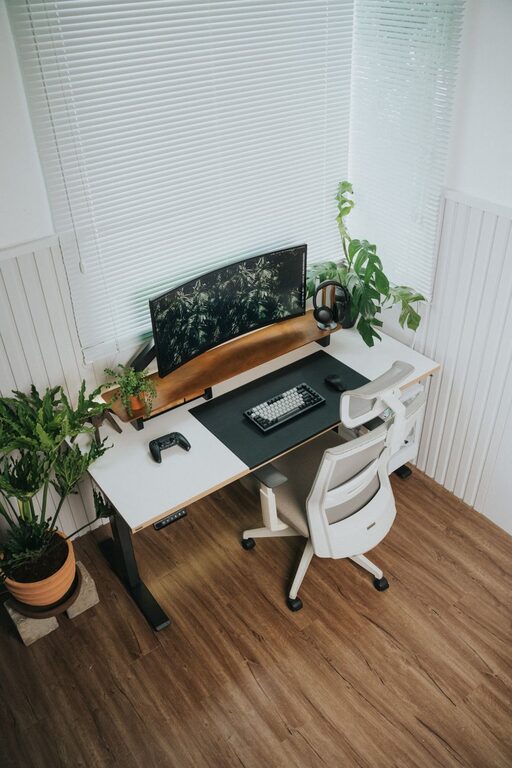
Creating a productive home office environment is essential for anyone working remotely or studying from home. A well-organised and comfortable workspace can enhance focus, reduce distractions, and keep motivation levels high throughout the day. Whether you have a dedicated room or just a small corner, these tips will help you set up an office that supports your work needs.
Choose the Right Location
Selecting the perfect spot for your home office is the first step to creating a productive space.
– Quiet and Private: Aim to find a location away from high-traffic areas to minimise noise and interruptions.
– Natural Light: Position your desk near a window if possible. Natural light boosts mood and energy.
– Ventilation: Good airflow keeps the room fresh and reduces fatigue.
– Space: Ensure there’s enough room for your desk, chair, and any equipment you need without feeling cramped.
If space is limited, a screen or room divider can create a sense of separation, signalling to others that you are working.
Invest in an Ergonomic Setup
Comfort plays a huge part in productivity. Long hours at a poorly designed workstation can cause discomfort and health problems.
– Chair: Choose an ergonomic chair that supports your lower back. Adjustable height and lumbar support are important features.
– Desk: Your desk height should allow your elbows to rest comfortably at a 90-degree angle.
– Monitor Placement: Position your screen so that the top of it is at or slightly below eye level, about an arm’s length away.
– Accessories: Use a keyboard and mouse that promote natural hand positioning. Wrist rests and footrests can also add comfort.
Taking care of your posture helps prevent fatigue and keeps you focused on the task at hand.
Declutter and Organise
A tidy space reduces stress and helps you stay on task.
– Storage Solutions: Use shelves, drawers, or filing cabinets to keep papers and office supplies organised.
– Minimal Desk Items: Keep only essential items on your desk to avoid distractions.
– Regular Cleaning: Take time each day to clear surfaces and put things away.
– Digital Organisation: Keep your digital files and emails organised by using folders and clear labelling systems.
Set up a routine where you spend a few minutes each day tidying your workspace.
Control Lighting and Temperature
Proper lighting and temperature impact your alertness and productivity.
– Lighting: Besides natural light, add adjustable desk lamps or ceiling lights with soft, warm tones to reduce eye strain.
– Avoid Glare: Position screens perpendicular to windows to minimise screen glare.
– Temperature: Maintain a comfortable room temperature, ideally between 20-22°C. Use fans, heaters, or humidifiers as needed to stay comfortable.
Adjust lighting and temperature throughout the day depending on your preferences and weather conditions.
Minimise Distractions
Distractions can severely impact your efficiency when working from home.
– Set Boundaries: Communicate with family members or housemates about your working hours and need for quiet.
– Noise Control: Use noise-cancelling headphones or background music if you find it helps concentration.
– Turn Off Notifications: Silence non-essential notifications on your phone and computer during focused work sessions.
– Breaks: Schedule regular breaks to refresh your mind, reducing the urge to browse unrelated websites while working.
Creating a distraction-free environment helps you enter a state of flow and complete tasks more quickly.
Personalise Your Space
Adding personal touches can make your home office inviting and motivating.
– Plants: Houseplants not only improve air quality but also provide a calming effect.
– Artwork: Include prints, photos, or motivational quotes that inspire you.
– Comfort Items: A cushion, blanket, or favourite mug can make the space cosy and welcoming.
– Colours: Choose colours that boost productivity—typically blues and greens for calmness, or yellows for creativity.
Personalisation should support your work mood rather than distract from it.
Establish a Routine
A structured schedule is key to maintaining productivity in a home office.
– Regular Hours: Try to start and finish work at consistent times.
– Morning Rituals: Begin your day with a routine that prepares you for work, such as exercise or planning your tasks.
– Designated Breaks: Take short breaks every hour and a longer lunch break to recharge.
– End-of-Day Routine: Set time to tidy your workspace and plan the next day’s priorities.
Having clear routines helps separate work from home life and keeps you focused during working hours.
Use Technology Wisely
Leverage technology to streamline your workflow, but avoid overloading your desktop.
– Task Management Tools: Use apps like Trello or Todoist to keep track of tasks.
– Communication Platforms: Set up professional channels such as Microsoft Teams or Zoom for meetings.
– Reliable Internet: Ensure you have a stable internet connection suitable for your work needs.
– Backup Solutions: Regularly back up important files using cloud storage or external drives.
Technology can be a great aid, but only if it is organised and used appropriately.
—
By following these tips, you can create a home office environment that promotes focus, comfort, and efficiency. Remember that your workspace should evolve with your needs, so don’t hesitate to adjust your setup to find what works best for you. A productive home office isn’t just about tools—it’s about creating a space where you feel motivated and ready to do your best work every day.